PlugTheHole Admin Exact Search
Find the right WordPress page, without losing other matches
PlugTheHole Admin Exact Search improves the search on your WordPress administration Pages and Posts screens. When a title matches your search exactly, the matching item appears first. Other relevant matches remain visible.
The free plugin works inside the familiar WordPress content lists. There is no separate search tool to learn, no external search service and no subscription.
Created by PlugTheHole.com.
WordPress websites often grow into hundreds or thousands of pages, posts and custom content items. Finding the right item should not mean searching through unrelated text or losing a useful result because another title matches exactly.
For example, searching for `account` should place a page titled Account above Account Details, My Account and Create an Account, while leaving those other pages in the list. PlugTheHole Admin Exact Search keeps this familiar, predictable workflow.
Key benefits
Find exact titles first
The page with precisely the title you entered receives priority. You spend less time looking through similarly named content.
Keep related results visible
An exact match never hides other results. Partial title matches stay in the list, so you still see the pages or posts connected to your search.
Search where you already work
Use the ordinary WordPress Pages, Posts and enabled custom post type list screens. The plugin does not add a second content library or replace the WordPress editor.
Keep searches focused
Title-only search starts enabled. Editors who need broader searches may include post excerpts and body content instead. Optional slug and numeric ID matching are available too.
Choose what matters to your team
Select which content types receive improved admin search. Choose whether to highlight exact matches, show a matching notice or give extra priority to titles starting with your search phrase.
Features
Exact title priority, without missing partial results
An exact title appears above other matches when exact-first ranking is enabled. The remaining matching results remain available in the normal WordPress list. Publishing status, permissions and other active WordPress filters still apply.
Title-only search by default
Search titles instead of searching every page body and excerpt. This keeps everyday editorial searches focused. Speed varies with your site’s content, database and other plugins, so no fixed performance claim is made.
![]()
Optional wider search
Disable title-only mode in the settings if you also want WordPress to match excerpts and post content. No new search page is required.
Pages, posts and custom post types
Pages are selected by default. Enable Posts or custom post types with WordPress administration list screens when needed. The plugin does not alter the public-facing website search.
Slug and numeric ID search
Turn on optional slug matching when you remember a URL name rather than a title. Enable ID matching when a developer or support ticket refers to a numbered post or page. Both options start disabled.
Extra priority for titles starting with the term
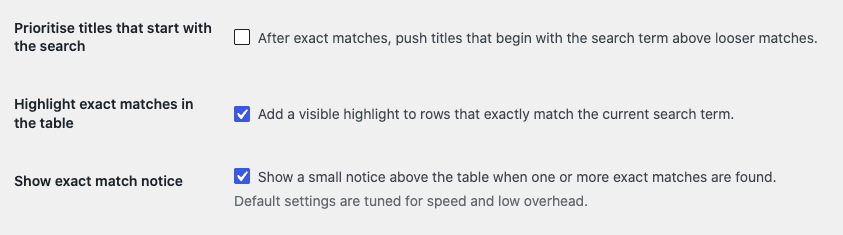
After exact matches, titles beginning with the search phrase may appear ahead of other partial matches. You control this option in settings.
Highlight exact title matches
Choose a subtle visual indication for matching rows in the usual WordPress table. This helps you spot the correct entry without replacing the standard administration interface.
Optional exact-match notice
Show an admin notice when an exact title match appears in the loaded results. Turn the notice off for a quieter editing interface.
Straightforward settings and clean-up
Configure the plugin under Settings → PlugTheHole Admin Exact Search. During deactivation from the Plugins screen, choose whether to keep the saved preferences or delete them. Standard WordPress removal cleans up the plugin’s own saved option.
Who is PlugTheHole Admin Exact Search for?
- Website owners: Find a page by its name before updating it.
- Content editors: Work through pages and posts with similar names.
- Agencies: Keep client content lists easier to search without training users on a new interface.
- Developers and support teams: Optionally find content by slug or numeric ID.
- Sites using custom post types: Apply the same search behaviour to supported administration lists.
Built with security and simplicity in mind
PlugTheHole Admin Exact Search runs in the WordPress administration area using the site’s existing WordPress database and permissions. It does not create a remote search account, send search terms to an outside service, add its own analytics tracker or create a separate database table.
The plugin changes eligible admin list queries, not your posts, page titles or website visitors’ search experience. It uses the WordPress settings interface, controlled search queries and standard permissions. Its default settings are intentionally focused, while optional matching features stay under your control.
Minimum declared requirements are WordPress 5.8 and PHP 7.4. The included interface languages are English, Dutch, German, French and Spanish. Actual compatibility still depends on your theme, plugins, WordPress version and hosting environment.

FAQ section
Does an exact match hide other search results?
No. Searching for `account` keeps Account Details, My Account and other partial title matches visible. The exact title Account receives priority.
Does this replace the WordPress search screen?
No. Use the ordinary search field on the selected Pages, Posts or custom post type administration lists.
Does the plugin search post content?
Title-only search is enabled by default. Disable the option if you also want searches to match excerpts and body content.
Will this affect the search box on my public website?
No. The plugin targets supported WordPress administration content lists. Public website search is unaffected.
Does the plugin work with custom post types?
Yes, for eligible post types with a WordPress administration list screen. Enable each type in the settings.
Will I be able to search by URL slug or post ID?
Both features are optional. Enable them when those fields are useful to your editorial workflow.
Why are some posts missing from my results?
Check your selected content type, current list filters and user permissions. With title-only mode enabled, a word appearing only in a post body does not match.
What happens to my settings when I deactivate the plugin?
A prompt on the normal Plugins screen lets you keep or remove the saved options. Keeping them supports a later reactivation.
I previously used Admin Exact Search. Will my preferences survive?
Deactivate the previous plugin without selecting its data clean-up. The renamed plugin copies recognised earlier settings when activated. Check your settings after switching, then remove the earlier plugin.
Does the plugin store searches or send them elsewhere?
No. The plugin does not send search terms or content to an external service or create its own search-history database table.
Is there a Pro version?
No. PlugTheHole Admin Exact Search v1.2.0 is a free plugin with the listed functionality. There is no paid edition, licence requirement or promised upgrade.
Where do I get support?
Contact PlugTheHole.com at https://plugthehole.com/contact/ and include your WordPress version, PHP version and the steps needed to reproduce the issue.
Creator and disclaimer section
PlugTheHole Admin Exact Search is created by PlugTheHole.com.
PlugTheHole Admin Exact Search is an independent plugin. It is not affiliated with, endorsed by, sponsored by or officially connected to WordPress, the WordPress Foundation, Automattic or any other third-party platform or service unless explicitly stated. All third-party names and trademarks belong to their respective owners.